My Home Lab Network
My home lab is my personal tech haven right here in my home office. It's where I dive into the exciting world of IT technologies, hands-on and full throttle. Inside my lab, you'll find an array of hardware like servers, virtualization software, and all sorts of networking gear, carefully set up to fuel my curiosity.
In this space, I create virtual environments that serve as my playground for learning, experimenting, and testing without ever worrying about messing up my production systems. My home lab is where I prepare for IT certifications, sharpen my skills, and stay at the forefront of the latest tech trends. It's a controlled environment where I have the freedom to explore, grow, and push the boundaries of what's possible.
Below is a streamlined guide to the traffic orchestration within my home lab.
A user or device on the internet sends a request to your home lab.
- The request first goes through Cloudflare, which can provide security and caching benefits.
- After passing through Cloudflare, the request reaches my pfSense firewall. PfSense may perform security checks and routing decisions.
- All DNS requests, which are used to resolve domain names to IP addresses, are routed through Pi-hole. Pi-hole checks whether the requested domain is on its blocklist, and if it matches an ad-serving domain, it blocks the request, preventing ads from being displayed.
- pfSense Forwarding: Now, the request goes back to pfSense. At this point, pfSense has already performed initial security checks, so it forwards the request to the appropriate internal server based on my defined rules.
- Nginx Reverse Proxy: The request reaches my Nginx reverse proxy. Nginx is a powerful web server and reverse proxy server. It can handle incoming requests, perform SSL termination, load balancing, and route requests to the appropriate backend server within your home lab.
- Backend Server: Nginx routes the request to the specific backend server or service within my home lab that is configured to handle it. This could be a web application, API, or other services.
- Authentik Single Sign-On (SSO): Authelia sits in front of my web applications and enforces SSO. When a user accesses a protected resource, Authelia prompts for authentication. If the user is not already authenticated, they'll need to log in. Authentik verifies the user's identity and provides access to the requested resource if authentication is successful.
- FreeIPA Authentication Check: After Authentik authenticates the user, it can optionally make a call to FreeIPA for further authentication checks. FreeIPA can verify user identities, enforce access control policies, and provide centralized user management. This step ensures that the user has the appropriate permissions and is authorized to access the resource.
- Access Granted: If the user passes all authentication and authorization checks by Authentik and FreeIPA, they are granted access to the requested resource.
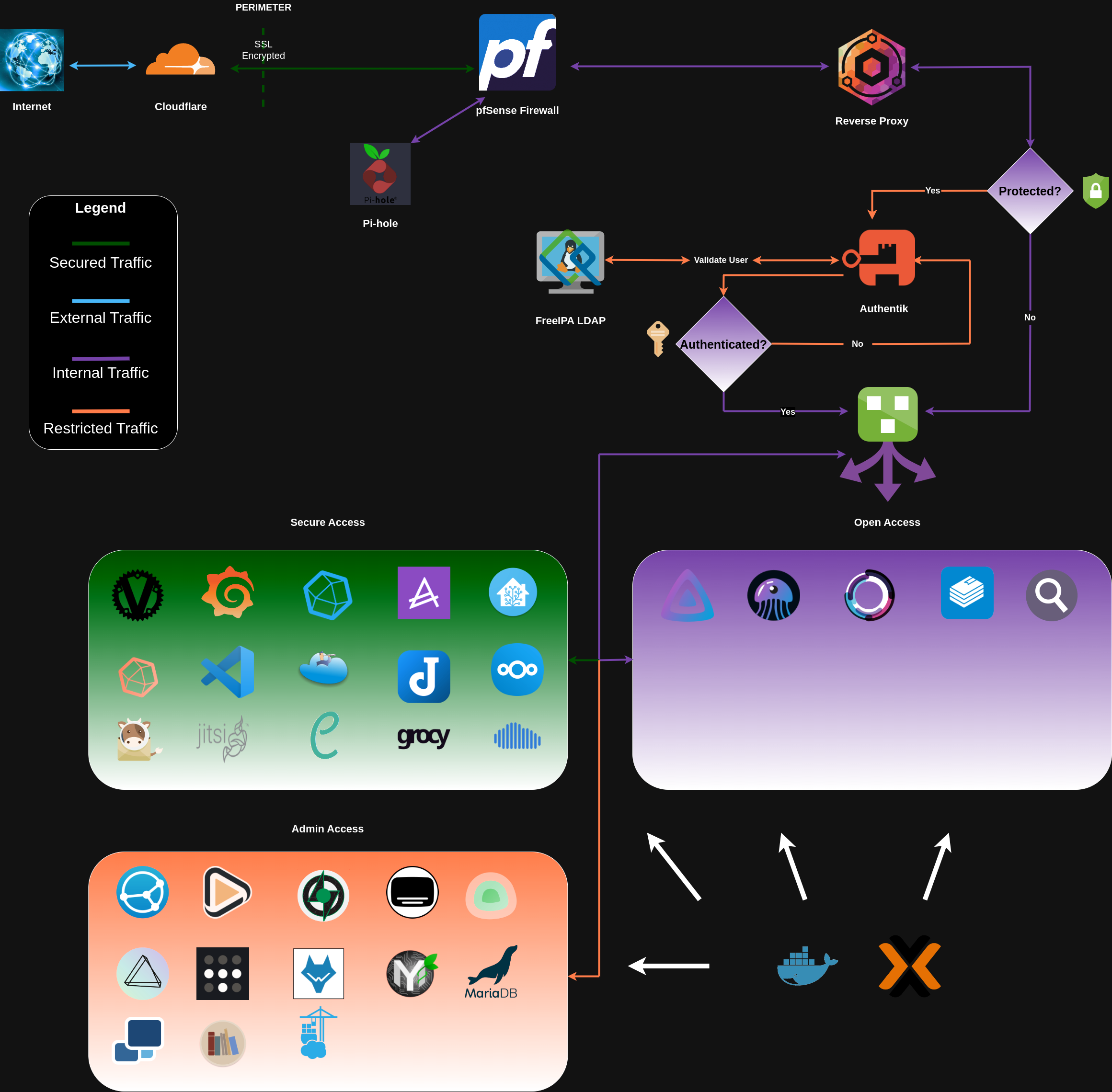
In my home lab, I've designed the flow of digital traffic to create an environment that prioritizes both security and seamless functionality, all without the need for overly elaborate descriptions.
At the forefront of this setup, Cloudflare takes on the role of a vigilant guardian. Its primary function is to manage incoming requests, focusing on two critical aspects: security and speed. It acts as a protective shield, filtering out potentially harmful traffic while optimizing the delivery of content to ensure lightning-fast performance.
Working in harmony with Cloudflare, we have pfSense, which can be likened to a seasoned conductor leading an orchestra. Its task is to direct the flow of data, ensuring that each request reaches its intended destination with precision. But that's not all – pfSense also plays a crucial role in safeguarding the network against digital threats. It's the digital gatekeeper, diligently monitoring and protecting my online world.
Now, let's talk about Pi-hole, a straightforward but incredibly effective component of this setup. Think of it as a watchful sentry against the intrusive world of ads. Its primary function is to intercept DNS requests, ensuring that every packet of data that traverses my network enjoys a clean and ad-free journey. No frills, just practical ad-blocking to enhance my online experience.
As the data makes its way back to pfSense, it's poised for a new journey, this time encountering Nginx – a versatile and efficient reverse proxy. Nginx doesn't just route requests; it skillfully balances the load, optimizing the performance of web applications and services. It's like the conductor of my web orchestra, ensuring a harmonious blend of performance and security in every online interaction.
But the grand finale is yet to come, starring Authentik, the Single Sign-On (SSO) virtuoso. Authentik simplifies user authentication, offering a seamless passport to access various services. And behind the scenes, FreeIPA takes on the role of a master of identity, ensuring that only users with the proper credentials are granted access to my digital realm.
In this carefully choreographed dance of data, my home lab is more than just a technical setup. It's a functional and secure digital sanctuary that reflects my commitment to a reliable and personalized online experience.